> ## Documentation Index
> Fetch the complete documentation index at: https://docs-hub.magicmealkits.com/llms.txt
> Use this file to discover all available pages before exploring further.
# Claude does not see a change you just made
> You added an account, turned on a service, or upgraded the hub, and Claude still acts like nothing happened. Why, and the one setting that fixes it.
You added an account, turned on a service, or upgraded the hub, and Claude
still says a tool or account is not there, or does not offer something you
just turned on.
Nothing is wrong with the hub. Claude keeps its own copy of the tool list, on
its own side, from the last time it fetched one. The hub changes instantly;
Claude does not notice until it asks again.
## Refresh Claude's copy
In Claude, open Settings, then Connectors, then this hub.
Press the menu button beside **Disconnect**, then **Refresh tools list**.
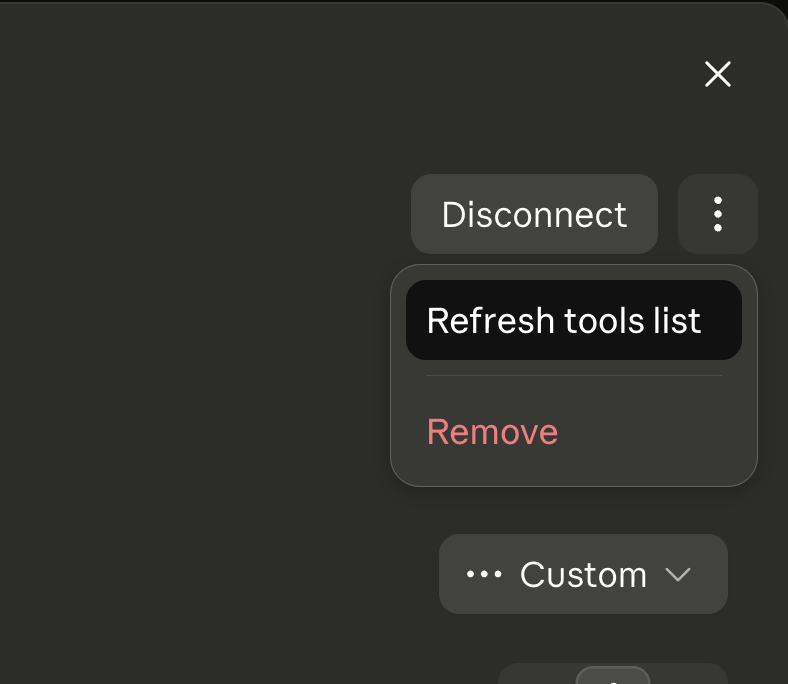 An existing conversation can still be holding the list it started with,
even after the refresh above. Starting a new one rules that out.
This is the same fix regardless of what changed: a new account, a newly
enabled service, and a hub upgrade all move the tool list the same way, and
Claude notices all three the same way too.
This page describes Claude's own settings. Other apps that speak MCP keep a
similar copy of the tool list and likely have an equivalent action
somewhere in their own connector settings, worded differently.
## Next
* [Troubleshooting](/troubleshooting)
* [Upgrading](/upgrading)
An existing conversation can still be holding the list it started with,
even after the refresh above. Starting a new one rules that out.
This is the same fix regardless of what changed: a new account, a newly
enabled service, and a hub upgrade all move the tool list the same way, and
Claude notices all three the same way too.
This page describes Claude's own settings. Other apps that speak MCP keep a
similar copy of the tool list and likely have an equivalent action
somewhere in their own connector settings, worded differently.
## Next
* [Troubleshooting](/troubleshooting)
* [Upgrading](/upgrading)