> ## Documentation Index
> Fetch the complete documentation index at: https://docs-hub.magicmealkits.com/llms.txt
> Use this file to discover all available pages before exploring further.
# Google Cloud 가입하기
> Google Cloud를 한 번도 써본 적 없는 분을 위한 첫 프로젝트 생성 안내입니다. 설치하기보다 먼저 진행하세요.
허브는 본인의 Google Cloud 프로젝트에서 실행되기 때문에, 설치하기 전에 결제가
연결된 프로젝트가 있어야 합니다. 이미 프로젝트가 있으시다면 이 페이지는
건너뛰고 바로 [설치하기](/ko/quickstart)로 가시면 됩니다. Google Cloud를 한
번도 안 써보셨다면, 가장 먼저 만드는 계정이 바로 이것입니다.
## 준비물
* **Google 계정.** 개인 Gmail 계정이면 됩니다. Google Workspace 계정으로는 이
무료 체험판에 가입하실 수 없습니다.
* **신용카드 또는 체크카드.** Google이 카드를 요청하는 이유는 실제 사람인지
확인하기 위해서이며, 바로 요금을 청구하기 위한 것이 아닙니다. 체험판이
끝나도 자동으로 결제되지 않습니다. 자세한 내용은 아래 "무료가 실제로
의미하는 것"에 있습니다.
* **휴대폰.** 본인인증 코드를 받으실 때 필요합니다.
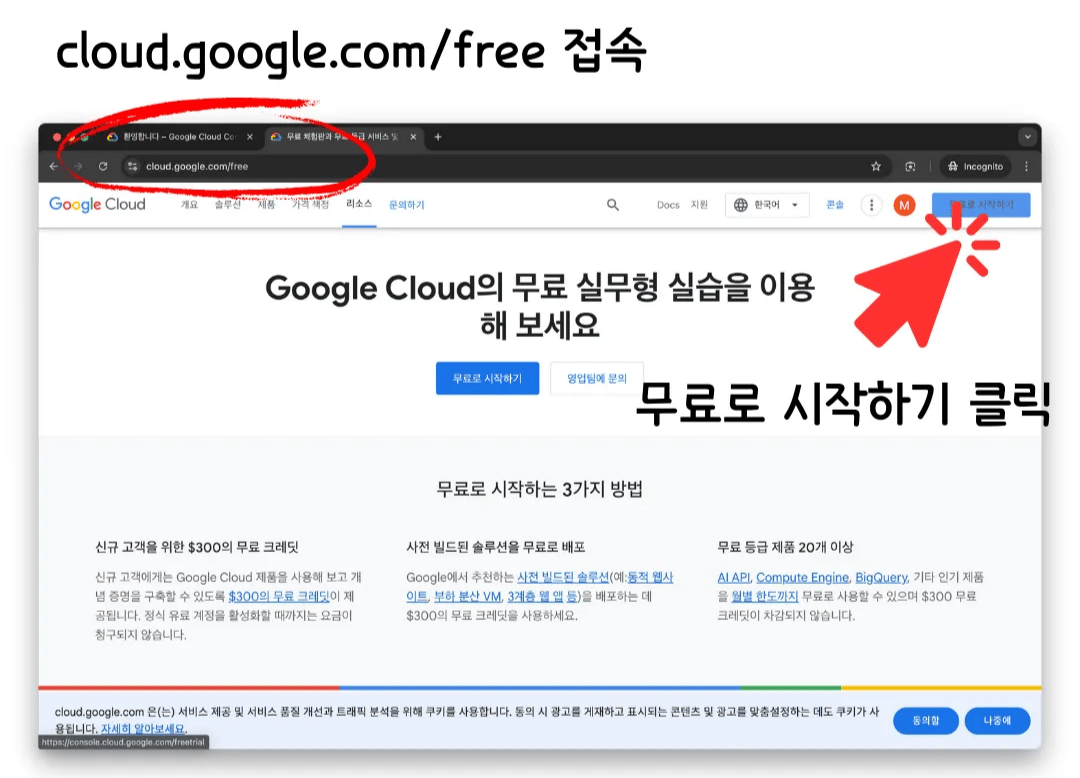
브라우저에서 [cloud.google.com/free](https://cloud.google.com/free)로
이동해 **무료로 시작하기**를 누르세요.
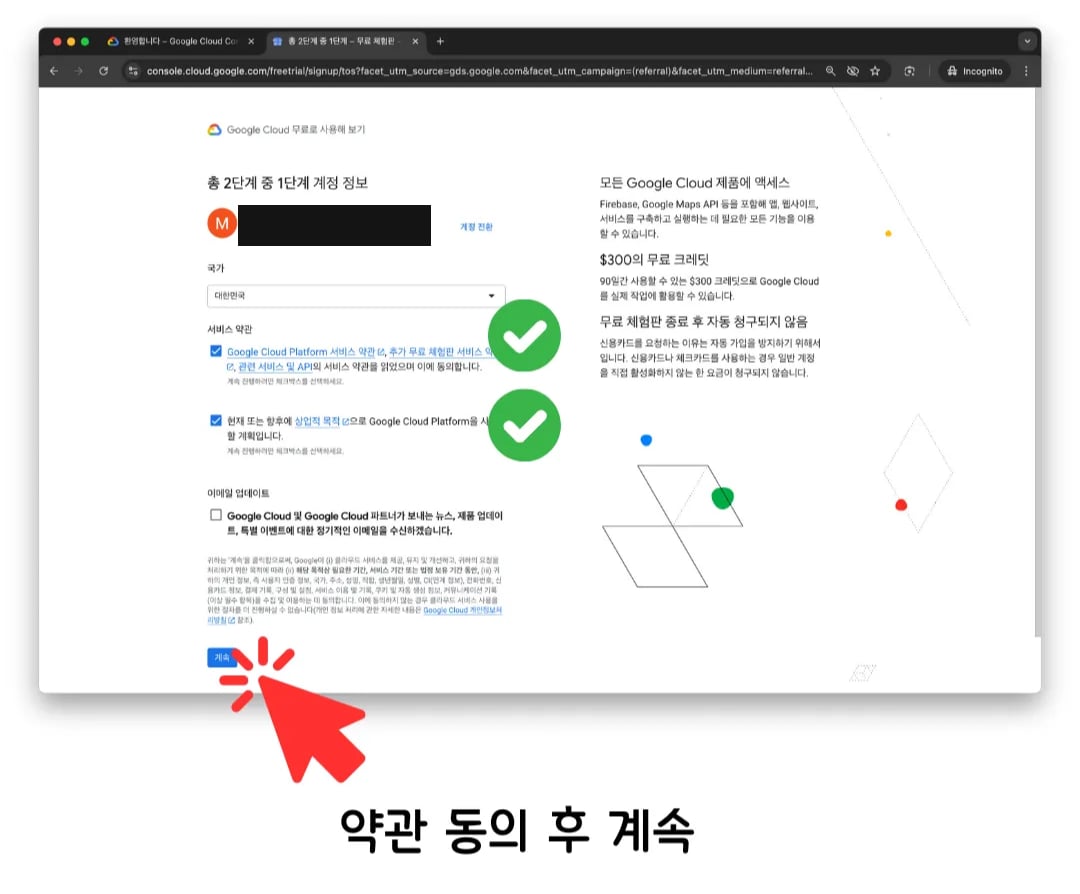
 국가를 선택하고 두 개의 약관 동의 체크박스를 모두 선택한 뒤 **계속**을
누르세요.
국가를 선택하고 두 개의 약관 동의 체크박스를 모두 선택한 뒤 **계속**을
누르세요.
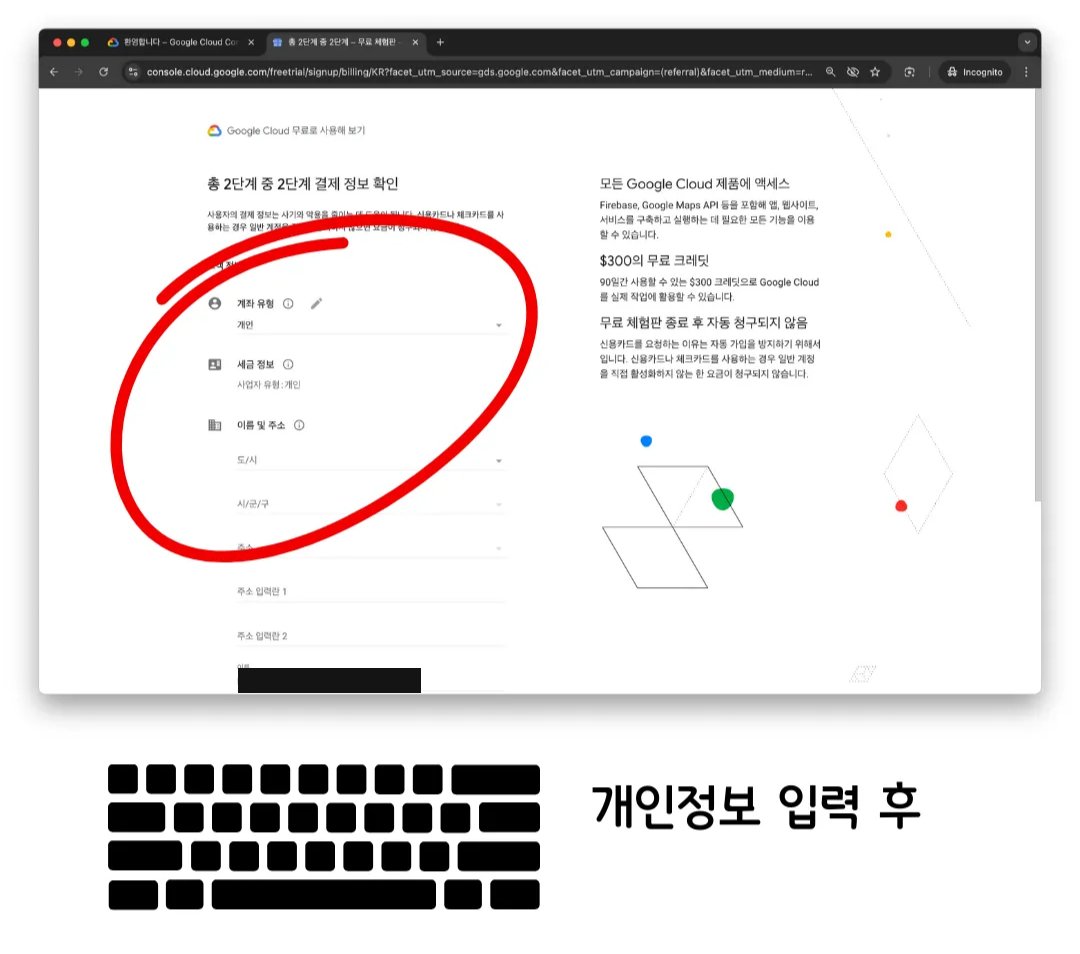
 계좌 유형, 세금 정보, 이름 및 주소를 입력한 뒤 다음 단계로 넘어가세요.
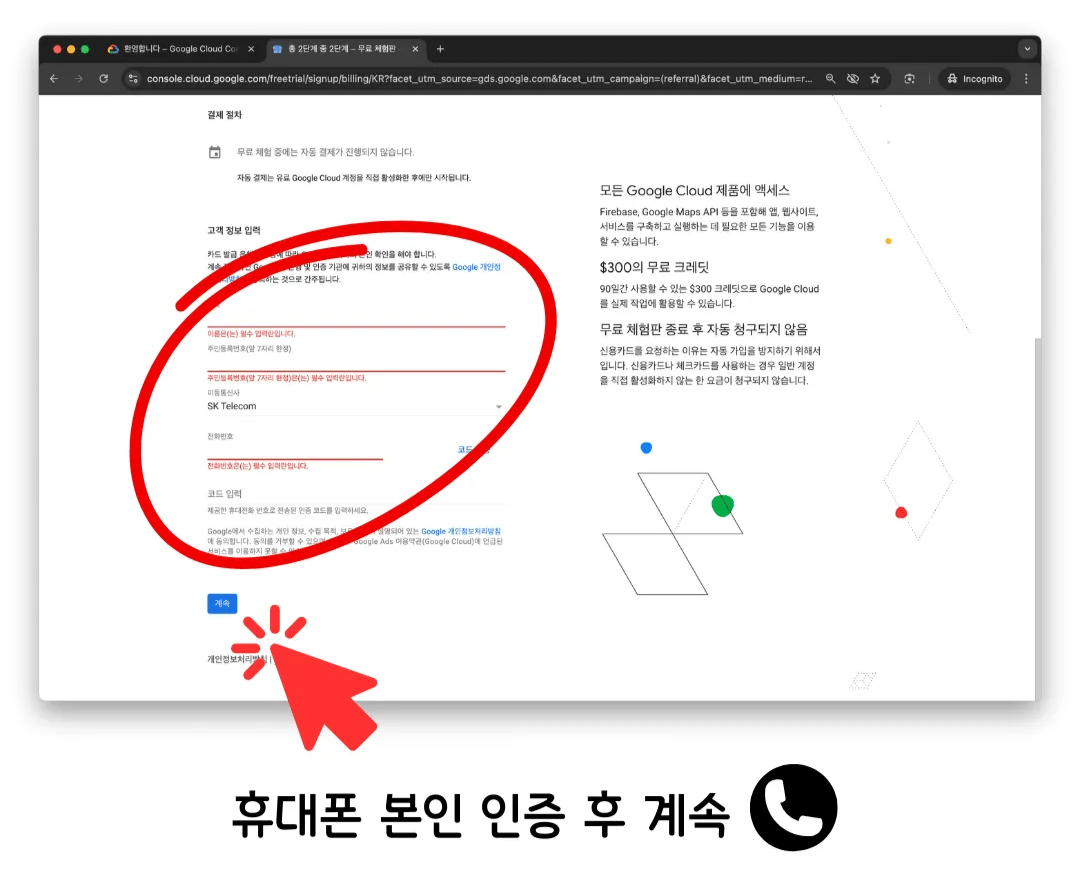
 전화번호를 입력하고 Google이 문자로 보낸 인증 코드를 입력한 뒤 계속
진행하세요.
전화번호를 입력하고 Google이 문자로 보낸 인증 코드를 입력한 뒤 계속
진행하세요.
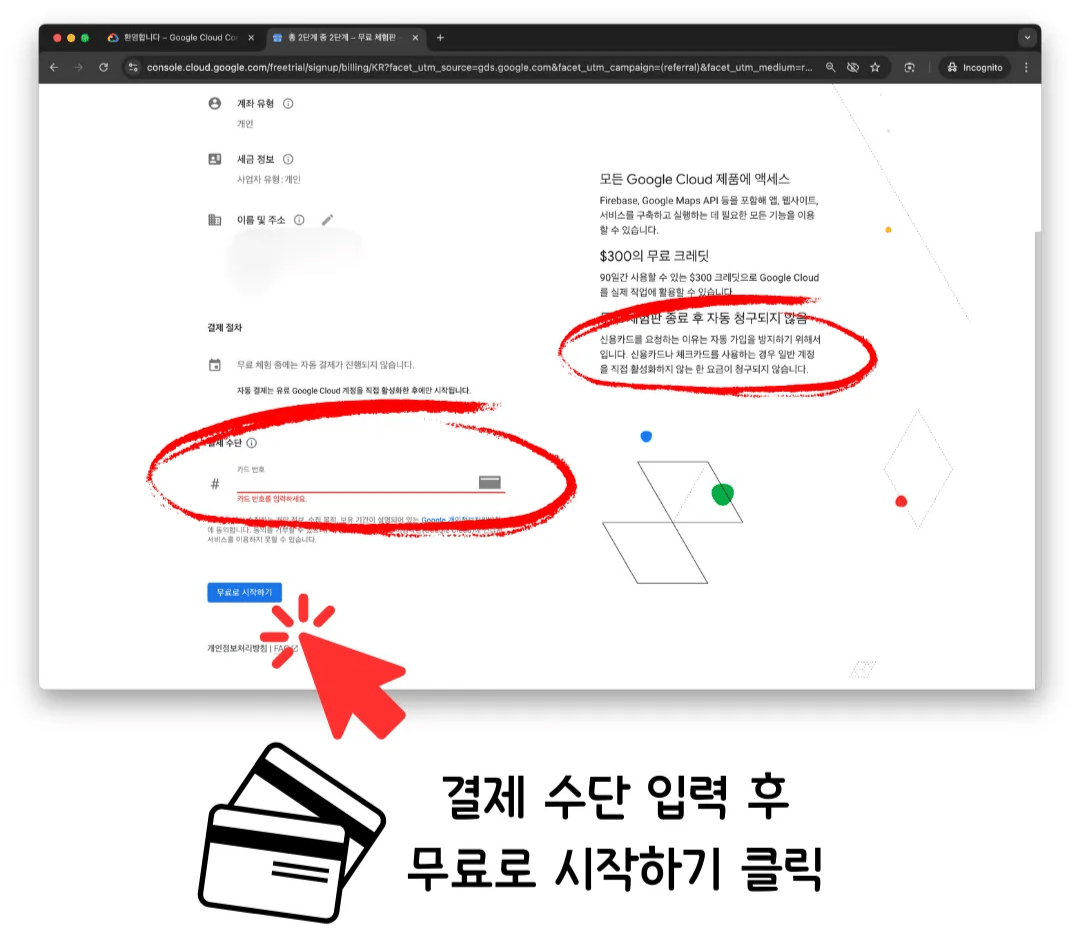
 카드 정보를 입력하고 **무료로 시작하기**를 누르세요.
 ## Google이 보여주는 설문조사
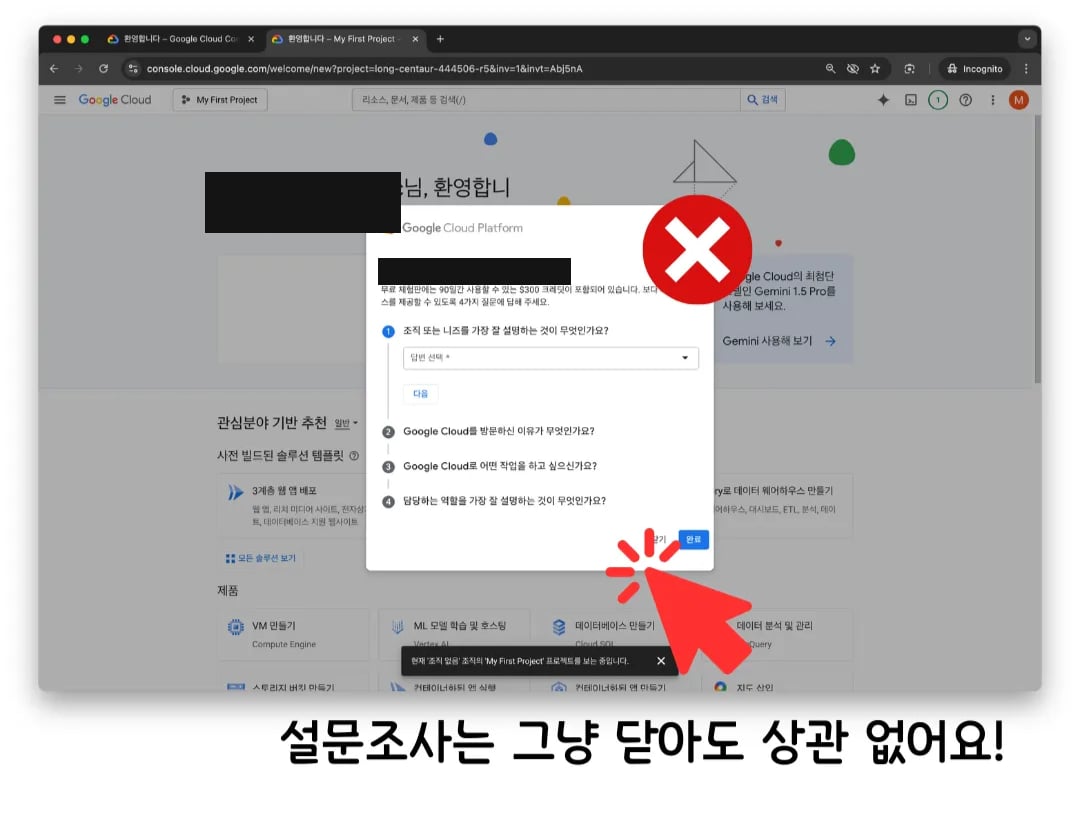
가입 직후 Google이 Cloud를 어디에 쓸 계획인지 묻는 짧은 설문조사를
보여줍니다. 답변하지 않아도 괜찮습니다. 닫으셔도 되고 원하시면 답하셔도
되는데, 어느 쪽이든 프로젝트는 이미 만들어진 상태입니다.
## Google이 보여주는 설문조사
가입 직후 Google이 Cloud를 어디에 쓸 계획인지 묻는 짧은 설문조사를
보여줍니다. 답변하지 않아도 괜찮습니다. 닫으셔도 되고 원하시면 답하셔도
되는데, 어느 쪽이든 프로젝트는 이미 만들어진 상태입니다.
 ## 무료가 실제로 의미하는 것
 * **90일 동안 \$300 크레딧**이 제공됩니다. 허브를 배포하고 운영하는 데 드는
비용보다 훨씬 큰 금액입니다. 실제 숫자는
[운영 비용](/ko/cost)에서 확인하실 수 있습니다.
* **자동으로 청구되는 요금은 없습니다.** Google이 카드를 요청하는 이유는
체험판을 반복해서 가입하는 것을 막기 위해서이지, 요금을 청구하기 위한
것이 아닙니다. 본인이 직접 유료 계정으로 전환해야만 청구가 시작됩니다.
* **Free Tier 제품은 90일이 지난 뒤에도 각자의 사용량 한도 안에서는 계속
무료**입니다. 허브가 실행되는 Cloud Run도 그중 하나입니다. 자세한 내용은
[운영 비용](/ko/cost)에 있습니다.
## 결제 계정, 지금 바로 활성화하기
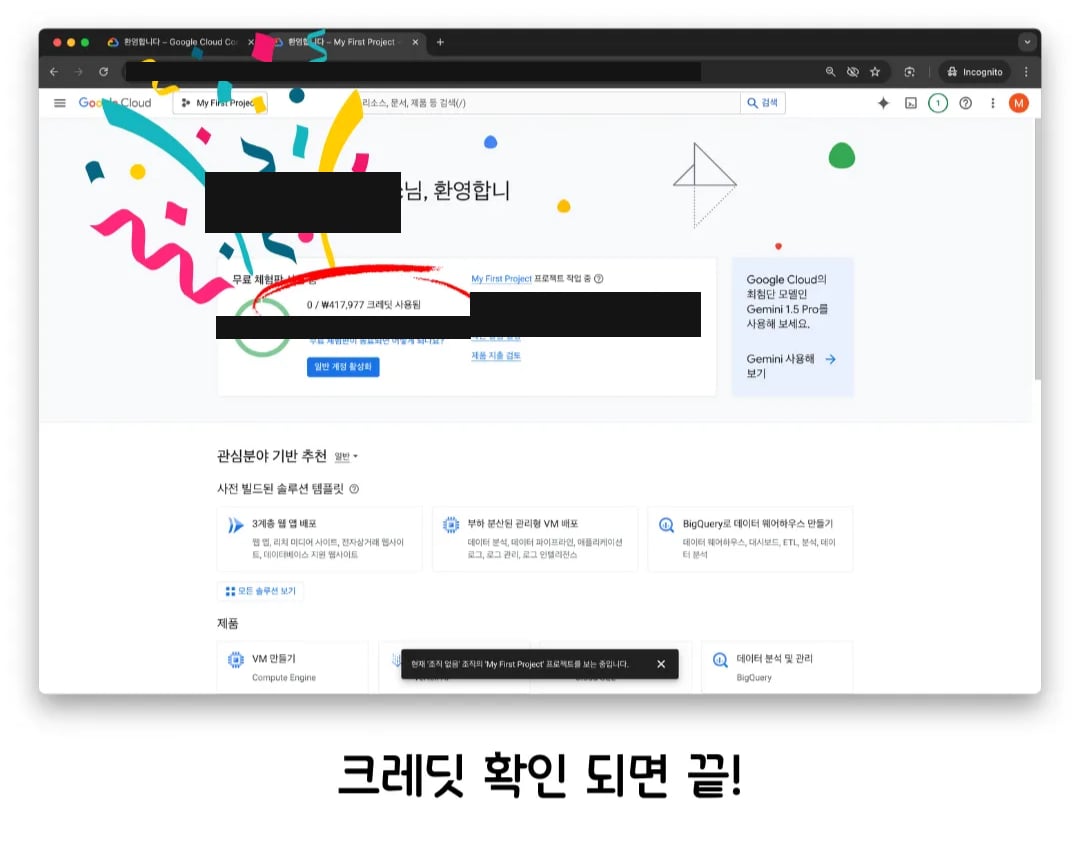
같은 화면에 **일반 계정 활성화**라는 버튼이 있습니다. 기다리지 마시고
지금 바로 눌러 두세요.
**이 단계를 건너뛰면 무료 체험판이 끝나는 약 90일 뒤에 허브가 멈출 수
있습니다.** 체험판 자체의 남은 기간 표시 말고는 별도의 경고가 없습니다.
Google이 "프로덕션 환경인가요?"라고 물어볼 수도 있는데, 어느 쪽으로
답하셔도 상관없습니다.
활성화한다고 해서 바로 요금이 청구되는 것은 아닙니다. 90일 체험판 기간이
지나도 Google Cloud를 계속 쓸 수 있게 해주는 것일 뿐이고, 체험판 기간과
마찬가지로 Free Tier 사용량 한도를 넘지 않는 한 비용은 발생하지 않습니다.
허브 규모에서 실제로 어느 정도인지는 [운영 비용](/ko/cost)에서 확인하실 수
있습니다.
## 다음
* [설치하기](/ko/quickstart), 방금 만든 프로젝트에 허브를 배포합니다
* [운영 비용](/ko/cost)
* **90일 동안 \$300 크레딧**이 제공됩니다. 허브를 배포하고 운영하는 데 드는
비용보다 훨씬 큰 금액입니다. 실제 숫자는
[운영 비용](/ko/cost)에서 확인하실 수 있습니다.
* **자동으로 청구되는 요금은 없습니다.** Google이 카드를 요청하는 이유는
체험판을 반복해서 가입하는 것을 막기 위해서이지, 요금을 청구하기 위한
것이 아닙니다. 본인이 직접 유료 계정으로 전환해야만 청구가 시작됩니다.
* **Free Tier 제품은 90일이 지난 뒤에도 각자의 사용량 한도 안에서는 계속
무료**입니다. 허브가 실행되는 Cloud Run도 그중 하나입니다. 자세한 내용은
[운영 비용](/ko/cost)에 있습니다.
## 결제 계정, 지금 바로 활성화하기
같은 화면에 **일반 계정 활성화**라는 버튼이 있습니다. 기다리지 마시고
지금 바로 눌러 두세요.
**이 단계를 건너뛰면 무료 체험판이 끝나는 약 90일 뒤에 허브가 멈출 수
있습니다.** 체험판 자체의 남은 기간 표시 말고는 별도의 경고가 없습니다.
Google이 "프로덕션 환경인가요?"라고 물어볼 수도 있는데, 어느 쪽으로
답하셔도 상관없습니다.
활성화한다고 해서 바로 요금이 청구되는 것은 아닙니다. 90일 체험판 기간이
지나도 Google Cloud를 계속 쓸 수 있게 해주는 것일 뿐이고, 체험판 기간과
마찬가지로 Free Tier 사용량 한도를 넘지 않는 한 비용은 발생하지 않습니다.
허브 규모에서 실제로 어느 정도인지는 [운영 비용](/ko/cost)에서 확인하실 수
있습니다.
## 다음
* [설치하기](/ko/quickstart), 방금 만든 프로젝트에 허브를 배포합니다
* [운영 비용](/ko/cost)